3.2.x Extensions Database 3.2 / 3.3Navbar 3.2.x

<span class="qte-attr qte_32_33-qte">3.2.x & 3.3.x</span>
User avatar

Topic Author
dmzx
Founder
Founder
Posts: 6584
Joined: 13 Jan 2014, 21:45
    Windows 10 Firefox

Navbar 3.2.x

Post by dmzx »

Extension Name: Navbar 3.2.x
Author: dmzx

Special thanks to: martin & Sniper_E

Extension Description:
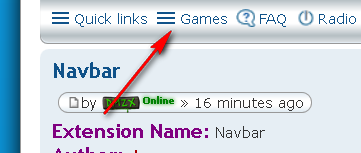
Extra navbar select menu use dmzx_navbar_quick_links as event to add the links.
Change language file to whatever you want the call the navbar menu.

See "Games" menu in navbar here.


Screenshot:
Image

Extension Download:


Installation:
  1. Download the latest release.
  2. Unzip the downloaded release, and change the name of the folder to `navbar`.
  3. In the `ext` directory of your phpBB board, create a new directory named `dmzx` (if it does not already exist).
  4. Copy the `navbar` folder to `/ext/dmzx/` if done correctly, you'll have the main extension class at
    (your forum root)/ext/dmzx/navbar/composer.json
  5. Navigate in the ACP to `Customise -> Manage extensions`
  6. Look for `Navbar` under the Disabled Extensions list, and click its `Enable` link.

User avatar

Jaantje
Users
Users
Posts: 356
Joined: 02 Nov 2014, 21:25
    Windows 10 Chrome

Re: Navbar 3.2.x

Post by Jaantje »

dmzx, martin and Sniper_E Thanx U :tumbsyes:
Grreeetttttzzzzz, Jaantje

User avatar

awr
Translators
Translators
Posts: 55
Joined: 13 Mar 2015, 08:50
    Mac OS X Safari

Re: Navbar 3.2.x

Post by awr »

Turkish Language Pack
tr.zip
You do not have the required permissions to view the files attached to this post.

User avatar

infspirit
Translators
Translators
Posts: 25
Joined: 13 Sep 2015, 20:50
    Windows 8.1 Chrome

Re: Navbar 3.2.x

Post by infspirit »

Spanish Language Pack
You do not have the required permissions to view the files attached to this post.

User avatar

martin
Admin
Admin
Posts: 5138
Joined: 06 Apr 2014, 16:12
    Windows 10 Chrome

Re: Navbar 3.2.x

Post by martin »

Dont know how to use it then see here viewtopic.php?f=49&t=1169
Image

User avatar

Scanialady
Users
Users
Posts: 310
Joined: 06 Apr 2015, 18:04
    Windows 10 Chrome

Re: Navbar 3.2.x

Post by Scanialady »

German language file
You do not have the required permissions to view the files attached to this post.
-
If you want to get German translations for extensions: ask me.

User avatar

Tastenplayer
Users
Users
Posts: 14
Joined: 05 Feb 2017, 21:20
    Windows 7 Firefox

Re: Navbar 3.2.x

Post by Tastenplayer »

I'm probably too stupid - I installed this extension yesterday at my local testboard.
But I do not find out how I can paste the links in this extension? Where I must edit it? I will make some radiolinks inside. Because there is no good radio extension until now.

Image
Be the best version of yourself rather than a bad copy of someone else!
Excuse me for my English, but I learned it by talking with people, not in school.

User avatar

Topic Author
dmzx
Founder
Founder
Posts: 6584
Joined: 13 Jan 2014, 21:45
    Linux Chrome

Re: Navbar 3.2.x

Post by dmzx »

To add some links use the dmzx_navbar_quick_links as an event.

So rename for example overall_header_navigation_append.html from an extension where the navbar link is in to dmzx_navbar_quick_links.html
then the link is shown into the menu.

User avatar

Tastenplayer
Users
Users
Posts: 14
Joined: 05 Feb 2017, 21:20
    Windows 7 Firefox

Re: Navbar 3.2.x

Post by Tastenplayer »

In this case , I must have also installed the navbar quicklinks extension?

User avatar

Topic Author
dmzx
Founder
Founder
Posts: 6584
Joined: 13 Jan 2014, 21:45
    Windows 10 Chrome

Re: Navbar 3.2.x

Post by dmzx »

Tastenplayer wrote: 06 Feb 2017, 21:07 In this case , I must have also installed the navbar quicklinks extension?
The extension in first post you need to install for this.

User avatar

ninouee
Users
Users
Posts: 32
Joined: 01 May 2016, 09:48
    Windows 7 Chrome

Re: Navbar 3.2.x

Post by ninouee »

Thank you for this extention :mml:

User avatar

cs.dk
Users
Users
Posts: 8
Joined: 03 Mar 2017, 18:07
    Linux Chrome

Re: Navbar 3.2.x

Post by cs.dk »

dmzx wrote: 06 Feb 2017, 20:57 To add some links use the dmzx_navbar_quick_links as an event.

So rename for example overall_header_navigation_append.html from an extension where the navbar link is in to dmzx_navbar_quick_links.html
then the link is shown into the menu.
I don't get it.
How do you actually use this extension?
I would like my regular quick links at the navbar, ie. unread posts, own posts, etc.


Thanks

User avatar

Scanialady
Users
Users
Posts: 310
Joined: 06 Apr 2015, 18:04
    Windows 10 Firefox

Re: Navbar 3.2.x

Post by Scanialady »

There is a character missing, an "s", it has to be dmzx_navbar_quick_links

User avatar

martin
Admin
Admin
Posts: 5138
Joined: 06 Apr 2014, 16:12
    Linux Chrome

Re: Navbar 3.2.x

Post by martin »

Scanialady wrote: 04 Mar 2017, 23:44 there is a character missing, an "s", it has to be dmzx_navbar_quick_links
Posts and quotes fixed well spotted.

User avatar

Donald123
Users
Users
Posts: 1
Joined: 06 Mar 2017, 14:25
    Windows 10 Chrome

Re: Navbar 3.2.x

Post by Donald123 »

Hi

great :cool:

Thank you for this extention :thumbdown:

Post Reply Previous topicNext topic