3.3.x Extensions Database 3.2 / 3.3Cron Status

<span class="qte-attr qte_32_33-qte">3.2.x & 3.3.x</span>
Post Reply Previous topicNext topic
User avatar

Topic Author
dmzx
Founder
Founder
Posts: 6582
Joined: 13 Jan 2014, 21:45
    Mac OS X Chrome

Cron Status

Post by dmzx »

Extension Name: Cron Status

Author: dmzx

Special thanks to: martin

Extension Description:
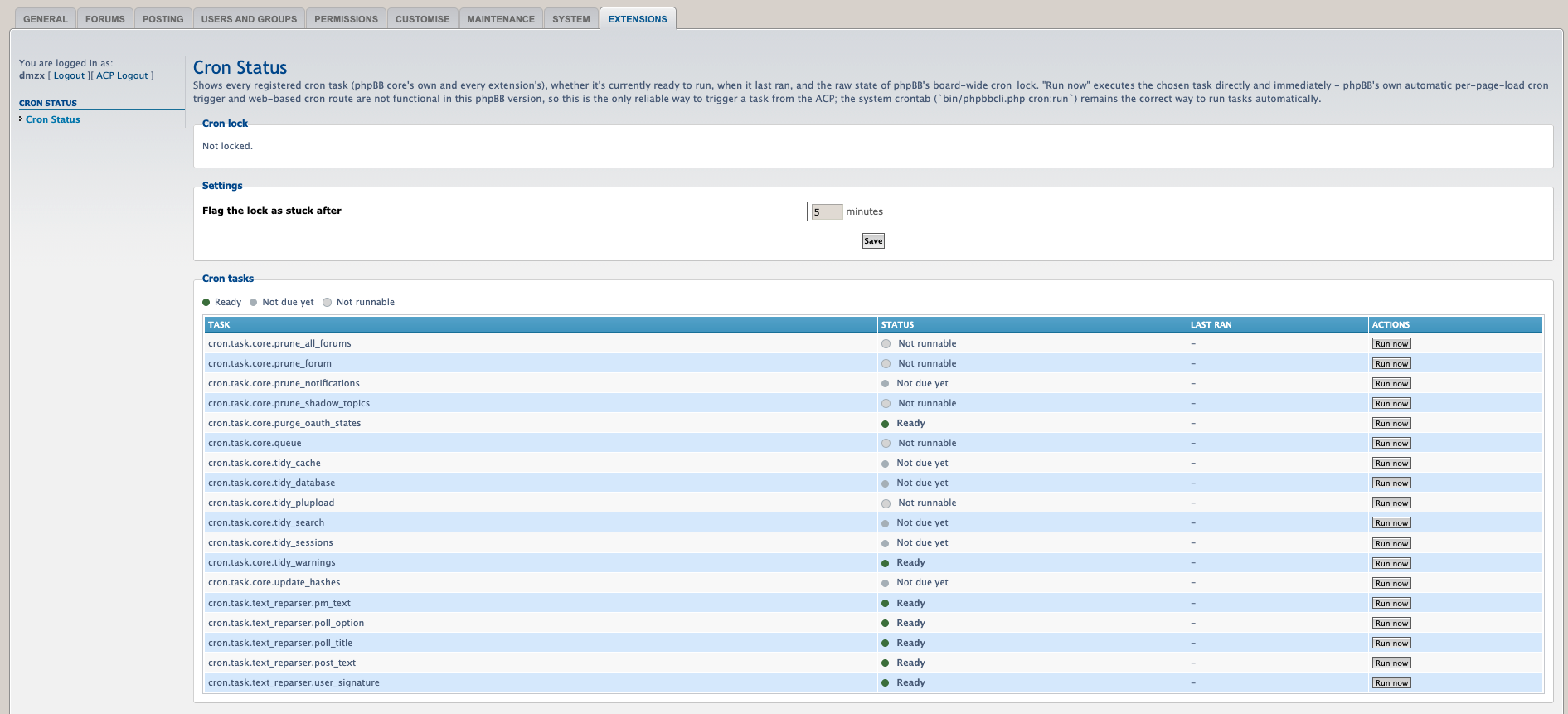
Cron Status — See which cron tasks are ready, detect a stuck cron_lock with its exact age, and clear it safely from the ACP


- Removed the redundant m2_add_crash_detection migration — its config values were already added by m1_install, so it was silently short-circuited by phpBB's migrator and never actually ran. m3_add_last_run_tracking now depends on m1_install directly.
- Added README.md.

Screenshots:
Image

Extension Download:


Installation:
  1. Download the latest release.
  2. Unzip the downloaded release, and change the name of the folder to `cronstatus`.
  3. In the `ext` directory of your phpBB board, create a new directory named `dmzx` (if it does not already exist).
  4. Copy the ` cronstatus` folder to `/ext/dmzx/` if done correctly, you'll have the main extension class at
    (your forum root)/ext/dmzx/cronstatus/composer.json
  5. Navigate in the ACP to `Customise -> Manage extensions`
  6. Look for `Cron Status` under the Disabled Extensions list, and click its `Enable` link.

User avatar

SpIdErPiGgY
Users
Users
Posts: 124
Joined: 04 Feb 2021, 23:54
    Windows 10 Firefox

Re: Cron Status

Post by SpIdErPiGgY »

Cron Status 1.0.0 - Installation memory exhaustion

I am getting a reproducible PHP memory exhaustion error while installing Cron Status 1.0.0 on phpBB.

Environment:
  • Debian 12
  • Plesk
  • PHP 8.5
  • phpBB
  • Cron Status 1.0.0
With memory_limit = 512M, installation fails with:

Code: Select all

Fatal error: Allowed memory size of 536870912 bytes exhausted
(tried to allocate 400556096 bytes)
in /var/www/vhosts/spiderpiggy.com/forum.spiderpiggy.com/phpbb/db/driver/driver.php
on line 1112
I then increased the PHP memory limit to 1024M.

The effective PHP configuration was confirmed with:

Code: Select all

memory_limit => 1024M => 1024M
The installation still fails, but now with:

Code: Select all

Fatal error: Allowed memory size of 1073741824 bytes exhausted
(tried to allocate 803209680 bytes)
in /var/www/vhosts/spiderpiggy.com/forum.spiderpiggy.com/phpbb/db/driver/driver.php
on line 1112
What is particularly suspicious is that the requested allocation appears to scale almost proportionally with the PHP memory limit:

Code: Select all

512M limit  -> tried to allocate 400,556,096 bytes
1024M limit -> tried to allocate 803,209,680 bytes
This suggests that simply increasing memory_limit does not solve the problem.

I also noticed something unusual in the migration files.

m1_install.php already creates:

Code: Select all

['config.add', ['cronstatus_crash_task', '']],
['config.add', ['cronstatus_crash_time', 0]],
['custom', [[$this, 'add_crash_message_text']]],
including the cronstatus_crash_message entry in CONFIG_TEXT_TABLE.

However, m2_add_crash_detection.php appears to add the same settings again:

Code: Select all

['config.add', ['cronstatus_crash_task', '', true]],
['config.add', ['cronstatus_crash_time', 0, true]],
['custom', [[$this, 'add_config_text']]],
Its effectively_installed() method is:

Code: Select all

public function effectively_installed()
{
    return $this->config->offsetExists('cronstatus_crash_task');
}
Since cronstatus_crash_task is already created by m1_install, m2_add_crash_detection will appear to be effectively installed immediately after m1_install.

Then m3_add_last_run_tracking depends on m2_add_crash_detection:

Code: Select all

public static function depends_on()
{
    return ['dmzx\cronstatus\migrations\m2_add_crash_detection'];
}
I cannot confirm yet whether this migration structure is the direct cause of the memory exhaustion, but it looks unusual and may be worth checking.

There are no obviously huge SELECT queries in these migrations. m3_add_last_run_tracking only performs:

Code: Select all

SELECT config_name
FROM phpbb_config_text
WHERE config_name = 'cronstatus_last_runs'
So the amount of memory being allocated seems disproportionate to the actual migration queries.

Could you please check the migration chain and whether phpBB's migration/dependency handling could be looping or building an excessively large result while installing this version?

🧠 Spiderpiggy Trivia 🐷
Live trivia & chat • Scores, rankings & statistics 🏆
🇧🇪 🇳🇱 For Belgium & Netherlands users only
spiderpiggy.com

User avatar

Topic Author
dmzx
Founder
Founder
Posts: 6582
Joined: 13 Jan 2014, 21:45
    Mac OS X Chrome

Re: Cron Status

Post by dmzx »

SpIdErPiGgY wrote: Today, 07:40 I am getting a reproducible PHP memory exhaustion error while installing Cron Status 1.0.0 on phpBB.

Thanks for the detailed report — you were right that m1_install and m2_add_crash_detection duplicated the same config keys. Fixed in 1.0.1: m2 is removed, everything now lives in m1_install alone.

That said, I traced phpBB's own migrator source and confirmed the duplication was harmless — phpBB's effectively_installed() check made it skip m2's steps automatically, so it never actually ran a second time. It's not what caused your memory exhaustion.

To help pin down the real cause, could you try:

1. Installing on a clean/minimal test board with only Cron Status enabled — does it still run out of memory?
2. Testing on PHP 8.1 or 8.2 instead of 8.5, if you can — phpBB 3.3.x doesn't officially support 8.5 yet, and this looks like it could be a DB-driver-level incompatibility rather than anything extension-specific.
3. If it still fails, a backtrace at the crash point (driver.php line 1112) would help identify which query is ballooning.

Please update to 1.0.1 regardless — cleaner migrations either way

Post Reply Previous topicNext topic